Hi, all
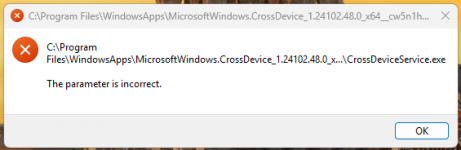
Merry Christmas to you! Can some kind person remove the misery I'm getting due to an error that shows several times after startup.
File attached.
Best regards, Pete
Merry Christmas! The error you’re seeing likely relates to a corrupted Microsoft.CrossDevice service. Here’s how to fix it:
Update Windows: Go to Settings > Windows Update > Check for updates.
Repair/Reset the App: In Settings > Apps > Installed Apps, locate "Microsoft.CrossDevice," click Advanced Options, and select Repair or Reset.
Reinstall via PowerShell: Run PowerShell as Admin and enter: Get-AppxPackage -allusers Microsoft.CrossDevice | Foreach {Add-AppxPackage -DisableDevelopmentMode -Register "$($_.InstallLocation)\AppXManifest.xml"}
Run System Scans: Open Command Prompt as Admin and run: sfc /scannow
DISM /Online /Cleanup-Image /RestoreHealth
Check Startup Programs: Use Task Manager (Ctrl + Shift + Esc) to disable unnecessary startup items.