

- Joined
- Nov 29, 2022
- Messages
- 1,347
- Reaction score
- 121
Meta recently replaced its native WhatsApp client for Windows with a progressive web app, and everyone hates it. Reddit and other corners of the internet are filled to the brim with complaints about the new client, its unhinged resource consumption, and other issues. A lot of users ask Meta to go back to the UWP client, which, albeit not perfect, was a much better program than the one we now have to deal with. While there is no official way to go back to the previous app, you can still restore the old WhatsApp client for Windows 10 and 11. Here is how to do it.
How To Go Back To The Previous WhatsApp Client On Windows?
If you want to restore the old WhatsApp client on Windows, you will need two things: an executable file of the final UWP version of WhatsApp and paused Microsoft Store updates. The latter is important because without it, Windows will update WhatsApp right after installing it, undoing all your work. Fortunately, both steps are quick and easy.
Note: This method will stop working at some point. Also, it goes without saying that you will not receive any updates for the old app, be it security updates, new features, etc. However, for now, the old client still works so that you can stay away from the new "app" at least for some time.
If you have WhatsApp installed on your PC, delete it first. Right-click the app and select Uninstall.
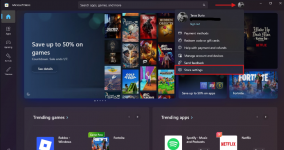
Go to the Microsoft Store, click your profile icon and select Store settings.
If you want to restore the old WhatsApp client on Windows, you will need two things: an executable file of the final UWP version of WhatsApp and paused Microsoft Store updates. The latter is important because without it, Windows will update WhatsApp right after installing it, undoing all your work. Fortunately, both steps are quick and easy.
Note: This method will stop working at some point. Also, it goes without saying that you will not receive any updates for the old app, be it security updates, new features, etc. However, for now, the old client still works so that you can stay away from the new "app" at least for some time.
If you have WhatsApp installed on your PC, delete it first. Right-click the app and select Uninstall.
Go to the Microsoft Store, click your profile icon and select Store settings.
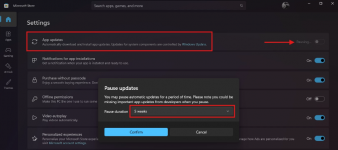
Toggle off Automatic Updates. When asked, select 5 weeks from the drop-down.
Download the executable file here. It was pulled directly from the Microsoft Store while it was still available (check its signature before installing in file properties). If you do not trust it, do not install. If you want to go back to the old WhatsApp client, you will have to trust whoever downloaded the MSIXBUNDLE file while it was still available. Sadly, you can no longer download it directly from the Microsoft Store (Meta pulled all old versions of the app).
Double-click the downloaded file and click Install.
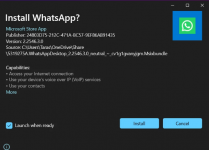
Now you have the old WhatsApp client for Windows.
After five weeks, the Microsoft Store will resume updates and update every outdated app on your system, including WhatsApp (sadly, Microsoft no longer allows disabling app updates for good). When that happens, repeat all the steps below and hope that by that moment, the old client will still work.