

InNeedOfAssistance
Member
- Joined
- Nov 15, 2021
- Messages
- 8
- Reaction score
- 1
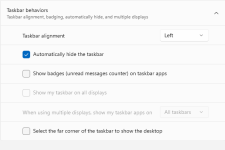
In the taskbar settings, I have "Automatically hide the taskbar" selected. If my mouse hovers over the taskbar, the bar appears and never auto hides. The only way to get the bar to auto hide again is to click on the start icon and then click on the desktop.
This is really annoying since I've had to resize all of the windows that I regularly keep open so the bottoms aren't cut off. Any suggestions on how to fix this?
What I'd REALLY like to do is keep the taskbar on the left as I used to in Windows 10 but ...
This is really annoying since I've had to resize all of the windows that I regularly keep open so the bottoms aren't cut off. Any suggestions on how to fix this?
What I'd REALLY like to do is keep the taskbar on the left as I used to in Windows 10 but ...
Attachments

Last edited: