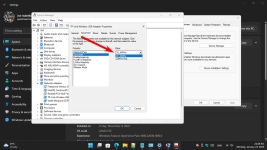
Hi, I have a "PowerOn DMG-04: Nano-Stick for 2,4 and 5 GHz WLAN":
Typ WLAN-Adapter
EAN 4260455645409
Hersteller-Nr. 88888151
Bauform USB
Anschlüsse Host Anschluss 1x USB-A 2.0
WLAN Verschlüsselung AES, WPA, WPA2, 64-Bit-WEP, 128-Bit-WEP
Transferrate 200 MBit/s (WLAN 2.4 GHz), 433 MBit/s (WLAN 5 GHz)
Treiber Windows 7/8/8.1/10/11, Linux ab Kernel 2.2.18
Feature QoS-WMM, WMM-PS, WPS, PIN, PBC
On my 5 year old laptop (WIN 10) it connects well automaticly to the 5GHz band, on my 1 yr. old PC (WIN 11) it connects automaticly to the 2,4 Ghz band (I can't choose which band to use although I understand that there might be a possibility to configure the router to show 2 different bands but I prefer to keep it the way it is if possible) .
So my questions are:
Why doesnt it connect automaticly to the 5Ghz band?
Is there a way to force it to do this?
Is the order of devices to connect to the network a factor for to which band the devices connect?
Thnx in advance for any answers!
Typ WLAN-Adapter
EAN 4260455645409
Hersteller-Nr. 88888151
Bauform USB
Anschlüsse Host Anschluss 1x USB-A 2.0
WLAN Verschlüsselung AES, WPA, WPA2, 64-Bit-WEP, 128-Bit-WEP
Transferrate 200 MBit/s (WLAN 2.4 GHz), 433 MBit/s (WLAN 5 GHz)
Treiber Windows 7/8/8.1/10/11, Linux ab Kernel 2.2.18
Feature QoS-WMM, WMM-PS, WPS, PIN, PBC
On my 5 year old laptop (WIN 10) it connects well automaticly to the 5GHz band, on my 1 yr. old PC (WIN 11) it connects automaticly to the 2,4 Ghz band (I can't choose which band to use although I understand that there might be a possibility to configure the router to show 2 different bands but I prefer to keep it the way it is if possible) .
So my questions are:
Why doesnt it connect automaticly to the 5Ghz band?
Is there a way to force it to do this?
Is the order of devices to connect to the network a factor for to which band the devices connect?
Thnx in advance for any answers!