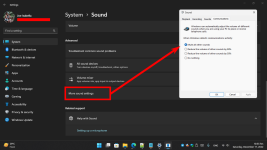
I don't know if this is a Windows Issue or a Microsoft Teams issue.
On my Windows 10 PCs this was a common scenario for me while working:
As soon as I answer the call, the sound on Windows 10 would switch to Teams and only teams. I would not be able to hear Pandora anymore. And as soon as the call would end, Pandora would become audible again.
But on Windows 11, I hear both Pandora AND whoever is talking on Teams. So I am forced to go hunt down that browser window, wherever it was and close the tab to silence Pandora
I have tried searching through both Teams settings and Windows 11 sounds settings for some sort of checkbox that controls this but I cannot find it. Is there a way to replicate this behavior on Windows 11?
On my Windows 10 PCs this was a common scenario for me while working:
- I am playing Pandora from a Web Browser window, using my Sony headset/headphones
- I get a call in Microsoft Teams
- I answer the call in Teams
As soon as I answer the call, the sound on Windows 10 would switch to Teams and only teams. I would not be able to hear Pandora anymore. And as soon as the call would end, Pandora would become audible again.
But on Windows 11, I hear both Pandora AND whoever is talking on Teams. So I am forced to go hunt down that browser window, wherever it was and close the tab to silence Pandora
I have tried searching through both Teams settings and Windows 11 sounds settings for some sort of checkbox that controls this but I cannot find it. Is there a way to replicate this behavior on Windows 11?