New Outlook 2024 desktop app does not sync all my mailboxes

asully102

Member
Joined
Aug 15, 2023
Messages
10
Reaction score
0
I am trying out the new Outlook 2024 desktop app with my four mailboxes. I've noticed it is only syncing my main account. For instance, I will log into Gmail (through Gmail.com) and have 8 unread emails. I delete all 8 and have zero emails in my Inbox. Some time goes by, I receive 2 new emails. I use the Outlook app, check my email, and now I have 10 emails, 2 new, and the 8 I previously deleted through Gmail. I cannot find any settings to set sync schedules or force sync.

Any ideas where to set the sync frequency?
 

Xploit Machine

私の人生の中で孤独な旅人
Administrator
Joined
Nov 29, 2022
Messages
1,347
Reaction score
121
is this the Outlook Beta which has been upgraded from Windows Mail or the one bundled with Microsoft Office?
 

Vote:

Xploit Machine

私の人生の中で孤独な旅人
Administrator
Joined
Nov 29, 2022
Messages
1,347
Reaction score
121
It's the Outlook Beta.

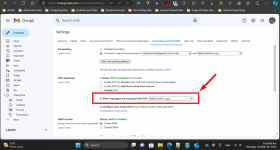
Outlook Beta works fine for me, as I never changed anything from its standard settings. I have 5 emails all synced automatically into Outlook since opening one-by-one in browser is time consuming .. try this in GMAIL settings;

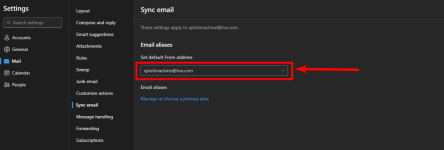
Also take note that the Outlook Beta has a special Deleted Items Recovery folder inside Deleted Folder (Trash Folder) itself rather than standard GMAIL's Trash Folder ..

1698301066241.png

1698301194487.png
 

Vote:

asully102

Member
Joined
Aug 15, 2023
Messages
10
Reaction score
0
Outlook Beta works fine for me, as I never changed anything from its standard settings. I have 5 emails all synced automatically into Outlook since opening one-by-one in browser is time consuming .. try this in GMAIL settings;

Also take note that the Outlook Beta has a special Deleted Items Recovery folder inside Deleted Folder (Trash Folder) itself rather than standard GMAIL's Trash Folder ..

View attachment 1399

View attachment 1400
I updated my Gmail's POP status to "When messages are accessed with POP: mark Gmail's copy as read." This seems to either have resolved it, or there was an update and it's just a coincidence it's syncing now. Thanks again.
 

Vote:

Ask a Question

Want to reply to this thread or ask your own question?

You'll need to choose a username for the site, which only take a couple of moments. After that, you can post your question and our members will help you out.

Ask a Question

Top