

Paige Miller
New member
- Joined
- Jan 20, 2022
- Messages
- 4
- Reaction score
- 0
Brand new computer, Windows 11 installed by the manufacturer, everything works well except Bluetooth. At first, I could get any Bluetooth device to connect to the computer, although these same devices connected properly to my tablet and my laptop and my computer at work.
Looking in Device Manager, I see the following:
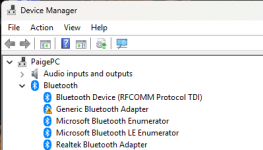
Note the yellow warning icon next to Generic Bluetooth Adapter. After much Googling, I decided to update the drivers, but each time I tried I got the message that the driver was already up to date. Then I decided to uninstall both the Generic Bluetooth Adapter and the Realtek Bluetooth Adapter. Then I was able to connect several Bluetooth devices, and I see this in Device Manager. Note that my devices now appear and function properly, but there is still a yellow warning icon.
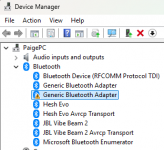
Anyway, the devices all work as expected ... but each time I restart the PC, I am back to the first screen capture, and I have to go through the process of uninstalling two adapters to get back to the desired state where everything works.
How do I stop this from happening, so like on my old PC, Bluetooth works as soon as I boot the PC. How do I make Harald Bluetooth happy?
Looking in Device Manager, I see the following:
Note the yellow warning icon next to Generic Bluetooth Adapter. After much Googling, I decided to update the drivers, but each time I tried I got the message that the driver was already up to date. Then I decided to uninstall both the Generic Bluetooth Adapter and the Realtek Bluetooth Adapter. Then I was able to connect several Bluetooth devices, and I see this in Device Manager. Note that my devices now appear and function properly, but there is still a yellow warning icon.
Anyway, the devices all work as expected ... but each time I restart the PC, I am back to the first screen capture, and I have to go through the process of uninstalling two adapters to get back to the desired state where everything works.
How do I stop this from happening, so like on my old PC, Bluetooth works as soon as I boot the PC. How do I make Harald Bluetooth happy?
